
Now on Google Play
LazyMeals vs Plan to Eat: which meal planning app is right for you?
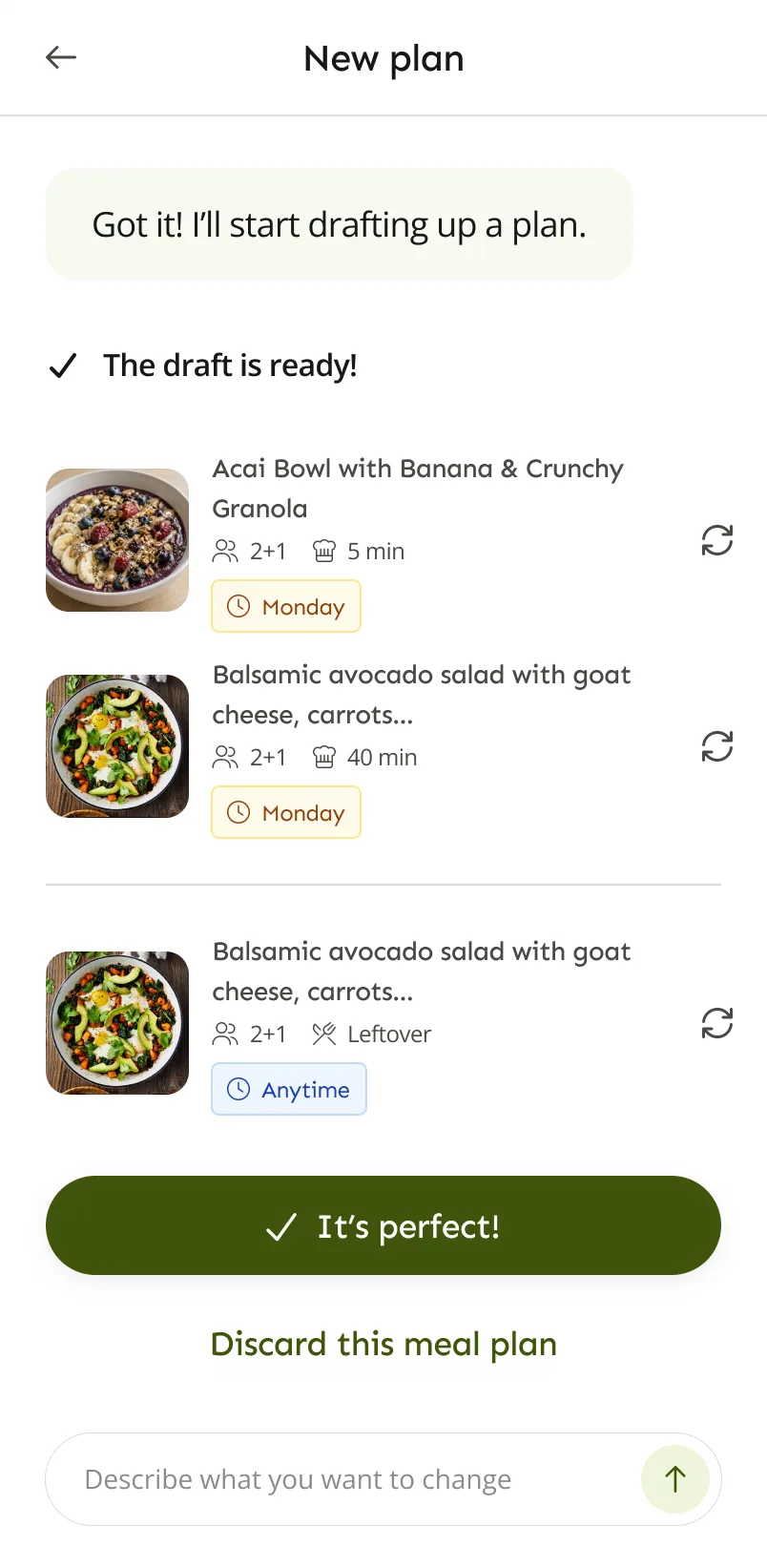
Both are built for a steady weekly routine that ends with a shopping list. The difference is who picks the meals. With Plan to Eat, you choose from your own recipes. With LazyMeals, the app drafts the plan and you adjust it.
The quick verdict
Plan to Eat suits people who know which recipes they want to cook. You clip recipes from the web, put them on a calendar and get a shopping list automatically. Plan to Eat says its planner works around your schedule, dietary needs and budget, and you stay in control of every choice.
LazyMeals suits people who would rather not choose every meal. It drafts a plan from your household’s preferences, and you change it by swapping recipes or describing what you want.
Plan to Eat and LazyMeals side by side
Plan to Eat details come from its meal planner, recipe clipper and pricing pages and its App Store listing.
| Compared | Plan to Eat | LazyMeals |
|---|---|---|
| Making a meal plan | You schedule your own recipes on a calendar by date and mealtime. Move recipes, change servings, plan leftovers and swap whole weeks. Menus let you reuse plans. Plan to Eat doesn’t offer pre-made meal plans. | LazyMeals drafts a plan from your household’s preferences and tells you why. Swap recipes, ask for changes and change portions. |
| Getting recipes in | A recipe clipper for Chrome, Firefox and Safari, plus sharing recipes from your phone’s browser on iPhone and Android. | Recipes come with your plan. With Premium, you can save the ones you like. No importing from websites or other apps. |
| Diets and budget | Plan to Eat says its planner works with your schedule, dietary needs and budget. You choose recipes that fit. | Diets, allergies, likes and dislikes for each person, and cooking preferences such as time, are part of how the plan is made. |
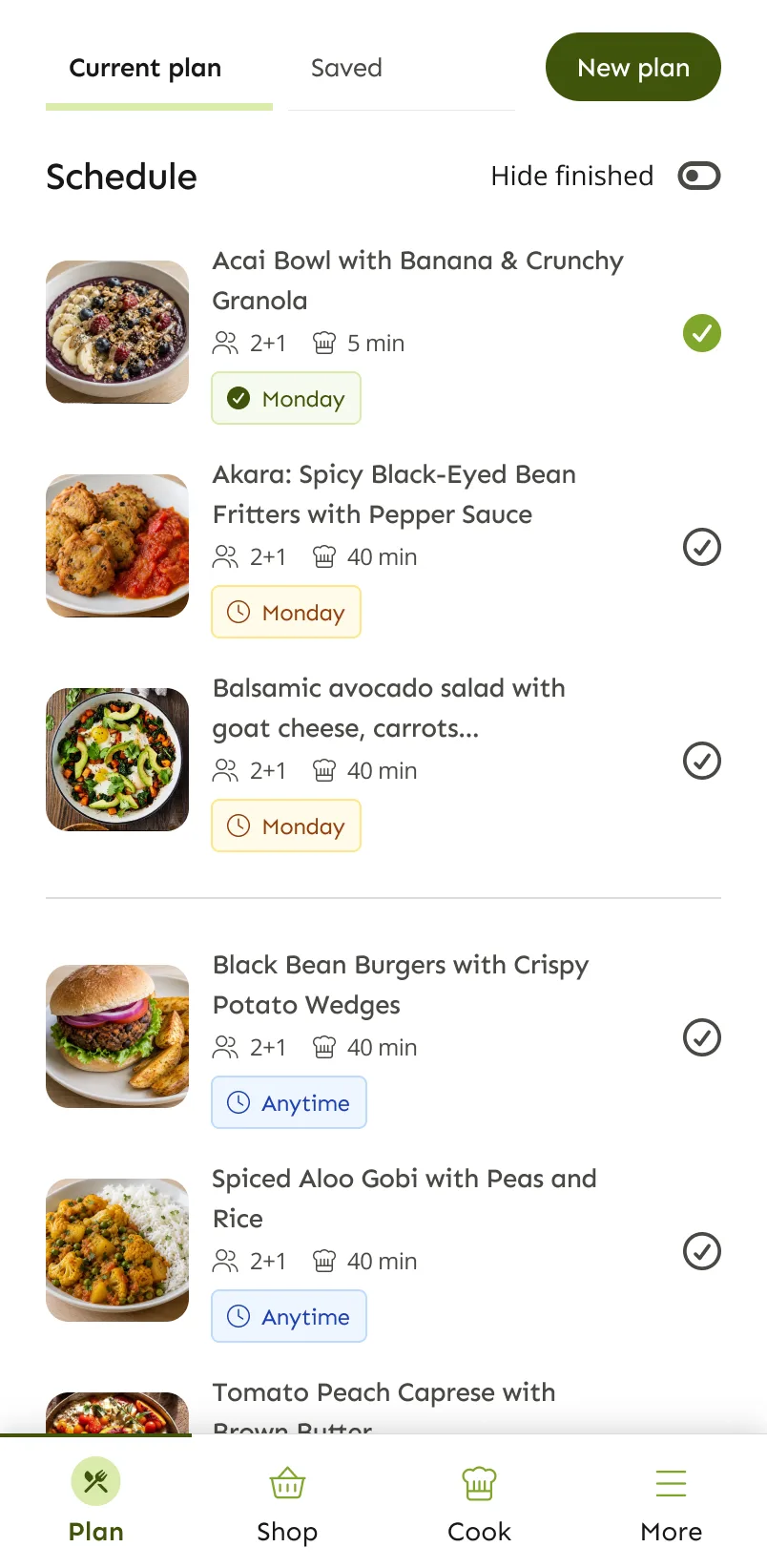
| Shopping list | Made automatically from the meals on your calendar. | Built from your plan, by ingredient or by recipe. Tick items off and add your own. |
| Household | One account can be shared with your household, on as many devices as you like. | Profiles for each person you cook for, including children without an account. Household members with their own account can share household plans. |
| Cooking | Cook View with timers, plus nutrition and macro totals. | Step-by-step cooking mode with timers and the ingredients for each step. |
| Platforms | Web, iPhone, iPad and Android. | Android. Coming soon to iOS. |
| Pricing | A 14-day free trial with no card needed, then $5.95 a month or $49 a year for every feature. These are the prices on plantoeat.com for subscriptions bought there. The page doesn’t name a currency or region. | A free plan, plus Premium ($4.99 or €4.99 a month, euro price incl. VAT). Yearly billing costs less. |
What Plan to Eat does well
Your recipes, your plan
Plan to Eat is built around recipes you already trust, and nothing goes on the calendar unless you put it there.
Easy recipe collecting
The recipe clipper works in desktop browsers and from the share menu on your phone.
Flexible planning tools
Move meals, change servings, plan leftovers, reuse menus and keep track of meals in your freezer.
Simple pricing
One subscription with every feature, and a free trial you can start without a card.
Where LazyMeals may fit better
You’re short on ideas
You don’t need a recipe collection to start. LazyMeals suggests recipes that fit your preferences.
Planning for different people
Everyone’s diets, allergies and dislikes are taken into account in one plan.
Changing course quickly
Describe what you want changed in the draft, like a quicker dinner on Thursday, before you accept the plan.
Which suits your routine?
You know what you like to cook
You’ll get the most from a tool that schedules your own recipes and builds the list from them.
Our suggestion: Plan to Eat
You like to plan on a computer
It works on the web as well as on iPhone and Android.
Our suggestion: Plan to Eat
You want hands-on control of every meal
Nothing is planned for you, so the week looks exactly the way you set it up.
Our suggestion: Plan to Eat
You run out of ideas by midweek
LazyMeals suggests the meals, so you don’t have to come up with them.
Our suggestion: LazyMeals
You cook for a household with mixed preferences
Everyone’s preferences go into one plan, with portions for adults and children.
Our suggestion: LazyMeals
Questions about Plan to Eat and LazyMeals
Does Plan to Eat create meal plans for you?
No. Plan to Eat says it has no pre-made meal plans: you use your own recipes and schedule them yourself. That’s its strength if you want full control.
Can Plan to Eat handle dietary needs?
Yes. Plan to Eat says you can make meal plans that work with your dietary needs and budget, using recipes you choose.
How much does Plan to Eat cost?
Its pricing page lists $5.95 a month or $49 a year after a 14-day free trial, for subscriptions bought at plantoeat.com. Prices can differ elsewhere, so check before you subscribe.
Can I move my Plan to Eat recipes to LazyMeals?
No. LazyMeals doesn’t import recipes from other apps or websites.
Can I use LazyMeals on the web?
No. LazyMeals is a mobile app for Android, coming soon to iOS. It isn’t an online meal plan generator.
Sources, checked on 2 November 2026: Plan to Eat meal planner · Plan to Eat recipe clipper · Plan to Eat pricing · Plan to Eat on the App Store (iPhone and iPad)
LazyMeals is independent and isn’t affiliated with Plan to Eat. Details about Plan to Eat come from its official website and app store listings and can change, so check there for the latest information.
Rather not plan every meal yourself?
LazyMeals is on Google Play. Download it, add your household and get your first plan.

Coming soon to iOS.